Connectivity Scanner
Automatically discover inter-system connections, data flows, and external dependencies from source code across 25+ programming languages.
Scan JavaScript/TypeScript, Python, Java, C#, Go, Rust, PHP, Ruby, and 20+ more languages to discover all external connections.
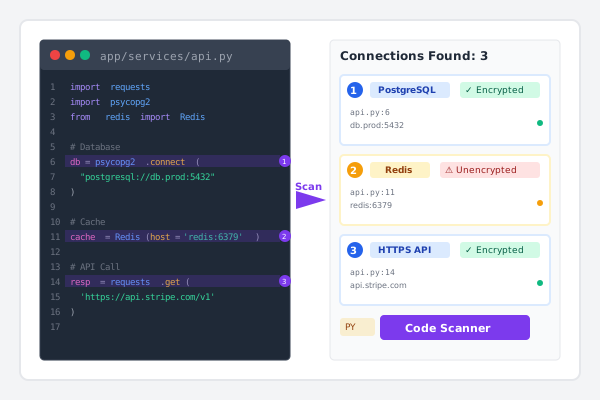
Automatically identify databases, APIs, message queues, cloud services, and authentication systems with encryption status.
Find connections that aren't in your IaC—application-level APIs, third-party services, and runtime dependencies.
Scan 10,000 lines of code per second. Process typical microservices (5K-50K lines) in under 10 seconds.
Beyond Infrastructure as Code
Infrastructure as Code tools like Terraform define your cloud resources—but they don’t show the full attack surface. Your application code makes dozens of connections to databases, APIs, and external services that aren’t in your IaC files. ThreatMitigator’s Connectivity Scanner bridges this gap.
The Problem: Hidden Connections
What IaC misses:
- REST API calls to third-party services
- Database connections from application code
- Message queue publishers and consumers
- Cloud SDK usage (S3 uploads, Lambda invocations)
- Authentication endpoints (OAuth, SAML, LDAP)
- WebSocket and real-time communication
- Email services, SMS gateways, and notification APIs
- Caching layers and session stores
The gap:
| |
But your Python code does this:
| |
Result: Incomplete threat models that miss critical attack vectors.
How Connectivity Scanner Works
1. Automatic Discovery
The scanner analyzes your source code to find:
Database Connections
- Relational: PostgreSQL, MySQL, SQL Server, Oracle, SQLite
- NoSQL: MongoDB, Redis, Cassandra, DynamoDB
- Graph: Neo4j, ArangoDB
- Time-series: InfluxDB, TimescaleDB
- ORMs and database client libraries
HTTP/HTTPS APIs
- REST API calls
- GraphQL endpoints
- SOAP services
- Webhook configurations
- All major HTTP client libraries
Message Queues & Event Streams
- RabbitMQ, Apache Kafka, Amazon SQS/SNS
- Azure Service Bus, Google Pub/Sub
- Redis Pub/Sub, NATS, Apache Pulsar
Cloud Service SDKs
- AWS SDK (S3, Lambda, EC2, DynamoDB, etc.)
- Azure SDK (Blob Storage, Functions, Cosmos DB)
- Google Cloud SDK (GCS, Cloud Functions, BigQuery)
Authentication & Identity
- OAuth endpoints and providers
- SAML identity providers
- LDAP/Active Directory
- API key usage and JWT tokens
Real-Time Communication
- WebSocket connections
- Server-Sent Events (SSE)
- Socket.io, MQTT
Email, SMS & Notifications
- SMTP connections
- Email APIs (SendGrid, Mailgun, AWS SES)
- SMS gateways (Twilio, AWS SNS)
- Push notification services
Caching & Storage
- Redis, Memcached
- Network file systems (NFS, SMB)
- Object storage (S3, Azure Blob, GCS)
- FTP/SFTP connections
2. Protocol Classification
For every discovered connection, the scanner identifies:
Encryption Status:
- ✅ Encrypted: TLS/SSL, HTTPS, WSS, SFTP, encrypted database connections
- ⚠️ Unencrypted: HTTP, plain TCP, FTP, unencrypted database connections
- ❓ Configurable: Runtime-determined encryption settings
Connection Direction:
- Outbound: Your app connects to external services
- Inbound: Your app accepts connections (listeners/servers)
- Bidirectional: Both client and server capabilities
Port Classification:
- Standard ports: Well-known service ports (80, 443, 3306, 5432)
- Non-standard ports: Custom or unusual port assignments
- Dynamic ports: Environment variable or runtime-configured
3. Context for Threat Modeling
Each connection includes rich context:
- Source location: File path, line number, function/method
- Variable names: Endpoint URLs, connection strings
- Authentication indicators: Credential usage patterns
- Comments: Developer documentation near connection code
This context feeds directly into STRIDE threat analysis:
- Spoofing: Which endpoints authenticate? How?
- Tampering: Are connections encrypted? Can data be modified?
- Repudiation: Are API calls logged? Which message queues track events?
- Information Disclosure: What data flows to third parties?
- Denial of Service: Which dependencies could fail?
- Elevation of Privilege: Which services have elevated access?
Language Coverage
ThreatMitigator scans 25+ programming languages with framework-aware detection:
Tier 1 Support (Comprehensive)
- JavaScript/TypeScript: Node.js, React, Vue, Angular, Express, Next.js
- Python: Django, Flask, FastAPI, SQLAlchemy, requests
- Java: Spring Boot, Jakarta EE, JDBC, Hibernate
- C#: .NET, ASP.NET Core, Entity Framework
- Go: Standard library, Gin, Echo, GORM
- Rust: Tokio, async-std, Actix, Diesel
- PHP: Laravel, Symfony, WordPress, Doctrine
- Ruby: Rails, Sinatra, ActiveRecord
Tier 2 Support (Common Patterns)
- Kotlin: Spring Boot, Ktor, Android
- Swift: iOS/macOS URLSession, Alamofire
- C++: Boost, Qt, libcurl, POCO
- C: POSIX sockets, libcurl, database drivers
- Scala: Akka, Play Framework, Slick
- Elixir: Phoenix, Ecto
Tier 3 Support (Core Libraries)
- Perl, R, Objective-C, Dart, Haskell
- Clojure, Lua, Shell/Bash, PowerShell
- Groovy, MATLAB
Framework-Aware: Recognizes patterns specific to popular frameworks like Spring Boot, Django, Rails, Express, Laravel, and ASP.NET Core.
Example Output
| |
Integration with IaC Scanning
ThreatMitigator combines Infrastructure as Code scanning with Connectivity Scanner for complete coverage:
IaC Scanning Finds:
- Cloud resource configurations (EC2, S3, RDS, etc.)
- Network security groups and firewall rules
- IAM policies and permissions
- Encryption settings for infrastructure
Connectivity Scanner Adds:
- Application-level API connections
- Third-party service dependencies
- Database connections from code
- Message queue usage patterns
- Authentication flow details
Combined Result:
Complete attack surface map showing both infrastructure and application-level threats.
| |
Performance & Accuracy
Speed
- 10,000 lines/second on standard hardware
- Microservices (5K-50K lines): < 10 seconds
- Large codebases (100K+ lines): < 5 minutes
- Parallel processing: Multi-core support for faster scanning
Accuracy
- <5% false positive rate: High precision connection detection
- <10% false negative rate: Catches well-formed connection code
- Confidence scoring: Every detection includes certainty percentage
- Pattern library: Continuously updated with new frameworks
Resource Usage
- <2GB RAM for codebases up to 500K lines
- Incremental scanning: Only re-scan changed files
- No compilation required: Static analysis of source code
Use Cases
Security Engineering
Challenge: “I need to know every external system our application talks to.”
Solution: Run connectivity scanner on your codebase to generate a complete inventory of all external connections, including those not documented or in IaC.
| |
DevSecOps
Challenge: “Which services are making unencrypted external calls?”
Solution: Filter scan results to find unencrypted connections and prioritize remediation.
| |
Compliance & Auditing
Challenge: “I need to document all third-party data sharing for GDPR compliance.”
Solution: Generate reports showing where your application sends data externally.
| |
Architecture Documentation
Challenge: “Our service dependency map is out of date.”
Solution: Automatically discover all service dependencies from source code.
| |
Configuration & Customization
Exclusions
Skip directories that shouldn’t be scanned:
| |
Custom Patterns
Add patterns for proprietary frameworks:
| |
Filtering
Ignore localhost and internal connections:
| |
Integration Examples
CI/CD Pipeline (GitHub Actions)
| |
Pre-Commit Hook
| |
Docker Integration
| |
Roadmap
Current (v1.0)
✅ 25+ language support ✅ Database, API, message queue detection ✅ Encryption status classification ✅ JSON/YAML output formats
Coming Soon (v1.1)
🔄 Data flow tracking: Follow data through the application 🔄 Credential analysis: Identify hardcoded secrets 🔄 IDE extensions: Real-time detection in VS Code, IntelliJ
Future (v2.0)
📋 Runtime validation: Compare static analysis to actual behavior 📋 Auto-documentation: Generate architecture diagrams 📋 Dependency graphs: Complete service dependency maps
Getting Started
Installation
| |
First Scan
| |
View Results
| |
Why Connectivity Scanner Matters
Traditional threat modeling requires manual architecture documentation that quickly becomes outdated.
Infrastructure as Code scanning shows your cloud resources but misses application-level connections.
ThreatMitigator’s Connectivity Scanner bridges the gap by automatically discovering connections from source code—giving you a complete, accurate, and always up-to-date view of your attack surface.
With connectivity scanning, you can:
- ✅ Find hidden attack surfaces in application code
- ✅ Identify unencrypted connections that need remediation
- ✅ Document third-party dependencies for compliance
- ✅ Generate accurate threat models without manual work
- ✅ Keep security current as code changes
Complete visibility. Automated threat modeling. From infrastructure to application.
See it in action
Discover hidden attack surfaces by scanning application code for connections not visible in Infrastructure as Code.
Ready to Secure Your Infrastructure?
Join teams already using ThreatMitigator to identify security threats in their Terraform code.